
 代码收藏家
代码收藏家 STM32三方库固件升级与OTA详解

一、Bootloader
1、Bootloader生成
|
官方网站:http://iot.rt-thread.com 官方文档:https://www.rt-thread.org/document/site/#/rt-thread-version/rt-thread-standard/application-note/system/rtboot/an0028-rtboot |
|
新建产品->固件升级->生成Bootloader:
|
|
将会生成bin固件发送到邮箱并下载:
|



2、Bootloader烧录
|
配置工程、Target->Production Programming(JLINK方式):
由于此时app分区还没有对应的app程序,所以会卡住:
|


二、Application
1、链接文件修改
|
修改程序链接脚本中ROM的起始地址和大小:
|

2、中断向量表地址偏移
|
由于App分区的起始地址为0x08020000(根据实际情况),需要修改链接脚本和中断向量的跳转地址; 注意:rt-thread/src/components.c->rtthread_startup为初始化函数,初始化完毕进入main。 |
|
修改中断向量表位置(board.c): RT_WEAK void rt_hw_board_init() { // 中断向量表偏移 SCB->VTOR = ((uint32_t)0x8020000); … … |
3、添加固件版本信息
|
在 main 函数中添加版本信息(用于区别APP分区): #define APP_VERSION "1.0.0"
int main(void) { rt_kprintf("/* ———Application——— */\n"); rt_kprintf("The current version of APP firmware is %s\n", APP_VERSION); … … |
4、FLASH及分区配置
|
SFUD(全称 Serial Flash Universal Driver)是一款开源的串行 SPI Flash 通用驱动库; FAL:Flash 抽象层。 使能组件:
修改board.h: #define BSP_USING_ON_CHIP_FLASH #define BSP_USING_SPI2
添加fal_config:
|
|
// 修改fal_cfg.h:
/******************************************* * File: fal_cfg.h * Describe: FAL_FLASH分区表 * Author: Xiangfu DING * Time: 2025-02-10 *******************************************/ #ifndef _FAL_CFG_H_ #define _FAL_CFG_H_
#include <rtconfig.h> #include <board.h>
#ifndef FAL_USING_NOR_FLASH_DEV_NAME #define NOR_FLASH_DEV_NAME "norflash0" #else #define NOR_FLASH_DEV_NAME FAL_USING_NOR_FLASH_DEV_NAME #endif
// STM32F407VGT6 – 内部 Flash 大小为 1024KB(分为 4 个 16KB 扇区、1 个 64KB 扇区、7 个 128KB 扇区) #define FLASH_SIZE_GRANULARITY_16K (4 * 16 * 1024) #define FLASH_SIZE_GRANULARITY_64K (64 * 1024) #define FLASH_SIZE_GRANULARITY_128K (7 * 128 * 1024)
#define STM32_FLASH_START_ADRESS_16K STM32_FLASH_START_ADRESS #define STM32_FLASH_START_ADRESS_64K (STM32_FLASH_START_ADRESS_16K + FLASH_SIZE_GRANULARITY_16K) #define STM32_FLASH_START_ADRESS_128K (STM32_FLASH_START_ADRESS_64K + FLASH_SIZE_GRANULARITY_64K) /* ===================== Flash device Configuration ========================= */ extern const struct fal_flash_dev stm32_onchip_flash_16k; extern const struct fal_flash_dev stm32_onchip_flash_64k; extern const struct fal_flash_dev stm32_onchip_flash_128k;
/* ===================== Flash device Configuration ========================= */ extern struct fal_flash_dev nor_flash0;
/* flash device table */ #define FAL_FLASH_DEV_TABLE \ { \ &stm32_onchip_flash_16k, \ &stm32_onchip_flash_64k, \ &stm32_onchip_flash_128k, \ &nor_flash0, \ } /* ====================== Partition Configuration ========================== */ #ifdef FAL_PART_HAS_TABLE_CFG /* partition table */ #define FAL_PART_TABLE \ { \ {FAL_PART_MAGIC_WROD, "app", "onchip_flash", 0 * 1024, 512 * 1024, 0}, \ {FAL_PART_MAGIC_WROD, "download", NOR_FLASH_DEV_NAME, 0 * 1024, 512 * 1024, 0}, \ } #endif /* FAL_PART_HAS_TABLE_CFG */
#endif /* _FAL_CFG_H_ */ |

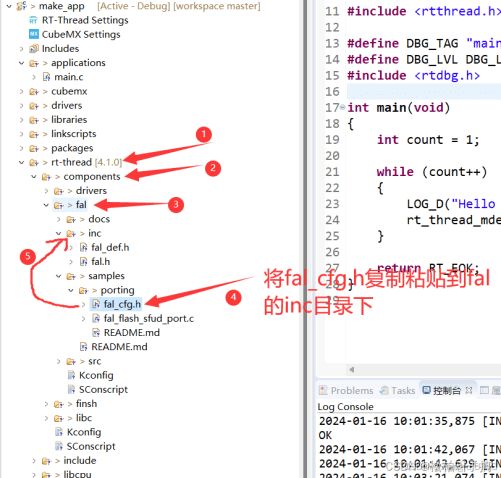
|
// 初始化
#include "fal.h"
int main(void) { // 初始化W25Q64 rt_hw_spi_device_attach("spi2", "spi20", GPIOB, GPIO_PIN_12); //flash名称要正确 if (RT_NULL == rt_sfud_flash_probe("W25Q64", "spi20")) { rt_kprintf("rt_sfud_flash_probe failed!\n"); } // 初始化FAL fal_init(); … … |

5、执行OTA升级
|
https://codeload.github.com/RT-Thread-packages/ota_downloader/zip/refs/tags/1.0.0 打开资源所在目录:
打包固件:
注意:OTA只会增量升级,固件版本必须大于当前app分区版本号才可以触发。 |


|
/******************************************* * File: sdota.c * Describe: SD卡固件升级 * Author: Xiangfu DING * Time: 2025-02-07 *******************************************/ #include "sdota.h" #include "core.h"
#include <rtdevice.h> #include <drv_common.h> #include <rtdbg.h> #include <finsh.h> #include <fal.h> #include <dfs_fs.h>
static void print_progress(size_t cur_size, size_t total_size) { uint8_t progress = cur_size * 100 / total_size; if (progress > 100) { progress = 100; } rt_kprintf("Download progress: %d%\n", progress); }
int sdOtaDownload(const char* uri) { const struct fal_partition *dl_part = RT_NULL; int begin_offset = 0; int file_size = 0; int fd; struct stat fileStat; uint8_t buffer[1024]; int ret = RT_EOK;
rt_kprintf("sdOtaDownload uri: %s\n", uri);
// 打开并检查固件是否存在 fd = open(uri, O_RDONLY); if (fd < 0) { rt_kprintf("Firmware does not exist!\n"); goto __exit; }
// 获取固件大小 if (stat(uri, &fileStat) == 0) { file_size = fileStat.st_size; rt_kprintf("Firmware size: %d\n", file_size); } else { rt_kprintf("Failed to get file size for %s\n", uri); goto __exit; }
// 获取下载分区信息并擦除下载分区数据 if ((dl_part = fal_partition_find("download")) == RT_NULL) { rt_kprintf("Firmware download failed! Partition (%s) find error!\n", "download"); ret = -RT_ERROR; goto __exit; }
// 擦除Download分区 rt_kprintf("Start erase flash (%s) partition!\n", dl_part->name); if (fal_partition_erase(dl_part, 0, file_size) < 0) { rt_kprintf("Firmware download failed! Partition (%s) erase error!\n", dl_part->name); ret = -RT_ERROR; goto __exit; } rt_kprintf("Erase flash (%s) partition success!\n", dl_part->name);
// 拷贝固件到Download分区 while (begin_offset < file_size) { // 读取文件到缓冲区 int length = read(fd, buffer, sizeof(buffer)); if (length < 0) { rt_kprintf("Read file error!\n"); ret = -RT_ERROR; goto __exit; }
// 写入闪存分区 if (fal_partition_write(dl_part, begin_offset, buffer, length) < 0) { rt_kprintf("Firmware download failed! Partition (%s) write data error!\n", dl_part->name); ret = -RT_ERROR; goto __exit; }
// 更新下载的偏移量 begin_offset += length;
// 打印下载进度 print_progress(begin_offset, file_size); }
// 重启升级固件 if (ret == RT_EOK) { rt_kprintf("Download firmware to flash success.\n"); rt_kprintf("System now will restart…\n");
rt_thread_delay(rt_tick_from_millisecond(5));
// Reset the device, Start new firmware extern void rt_hw_cpu_reset(void); rt_hw_cpu_reset(); } else { rt_kprintf("Download firmware failed!\n"); }
__exit: close(fd);
return ret; }
void sdota(int argc, char **argv) { sdOtaDownload(FIRMWARE_PATH); } MSH_CMD_EXPORT(sdota, "The sd card firmware is upgraded"); |
|
该软件包会自动勾选webclient软件包:
|
|
HTTP升级源码位置:
使用示例: http_ota http://192.168.0.108:8080/download/rtthread.rbl |


作者:Xiangfu DING


