
 代码收藏家
代码收藏家 【STM32】GPIO口操作与输出实战指南
STM32操作GPIO口——点灯大师
视频教程及资料来自江协科技
| 下载链接 | https://pan.baidu.com/s/1h_UjuQKDX9IpP-U1Effbsw?pwd=dspb |
|---|---|
| 压缩包解压密码 | 32 |
文章目录
操作GPIO的输出三个步骤
提示:这里可以添加本文要记录的大概内容:
- 使用RCC开启GPIO的时钟
- 使用GPIO_Init函数初始化GPIO
- 使用输出的函数控制GPIO口
在这里总共涉及了RCC和GPIO两个外设
一、RCC和GPIO两个外设库常用函数
1.RCC_AHB外设时钟控制
void RCC_AHBPeriphClockCmd(uint32_t RCC_AHBPeriph, FunctionalState NewState);
@ brief      启用或禁用AHB外设时钟。
@ param   RCC_AHBPeriph:指定要控制其时钟的AHB外设。
对于 @ STM32互联型设备,此参数可以是以下值的任意组合:
• @arg RCC_AHBPeriph_DMA1     • @arg RCC_AHBPeriph_DMA2
• @arg RCC_AHBPeriph_SRAM     • @arg RCC_AHBPeriph_FLITF
• @arg RCC_AHBPeriph_CRC      • @arg RCC_AHBPeriph_OTG_FS
• @arg RCC_AHBPeriph_ETH_MAC  • @arg RCC_AHBPeriph_ETH_MAC_Tx
• @arg RCC_AHBPeriph_ETH_MAC_Rx
对于 @ 其他STM32设备,此参数可以是以下值的任意组合:
• @arg RCC_AHBPeriph_DMA1     • @arg RCC_AHBPeriph_DMA2
• @arg RCC_AHBPeriph_SRAM     • @arg RCC_AHBPeriph_FLITF
• @arg RCC_AHBPeriph_CRC      • @arg RCC_AHBPeriph_FSMC
• @arg RCC_AHBPeriph_SDIO
@ note SRAM和FLITF的时钟只能在睡眠模式下被禁用。
@ param NewState:指定外设时钟的新状态。
此参数可以是:ENABLE(启用)或DISABLE(禁用)。
@retval 无返回值。
2.RCC_APB2和RCC_APB1
RCC_APB2外设时钟控制和RCC_APB1外设时钟控制操作方法一样
RCC_APB2外设时钟控制
void RCC_APB2PeriphClockCmd(uint32_t RCC_APB2Periph, FunctionalState NewState);
@ brief 启用或禁用高速APB(APB2)外设时钟。
@ param RCC_APB2Periph:指定要控制其时钟的APB2外设。
此参数可以是以下值的任意组合:
• @arg RCC_APB2Periph_AFIO      • @arg RCC_APB2Periph_GPIOA
• @arg RCC_APB2Periph_GPIOB     • @arg RCC_APB2Periph_GPIOC
• @arg RCC_APB2Periph_GPIOD     • @arg RCC_APB2Periph_GPIOE
• @arg RCC_APB2Periph_GPIOF     • @arg RCC_APB2Periph_GPIOG
• @arg RCC_APB2Periph_ADC1      • @arg RCC_APB2Periph_ADC2
• @arg RCC_APB2Periph_TIM1      • @arg RCC_APB2Periph_SPI1
• @arg RCC_APB2Periph_TIM8      • @arg RCC_APB2Periph_USART1
• @arg RCC_APB2Periph_ADC3      • @arg RCC_APB2Periph_TIM15
• @arg RCC_APB2Periph_TIM16     • @arg RCC_APB2Periph_TIM17
• @arg RCC_APB2Periph_TIM9      • @arg RCC_APB2Periph_TIM10
• @arg RCC_APB2Periph_TIM11
@ param NewState:指定外设时钟的新状态。
此参数可以是:ENABLE(启用)或 DISABLE(禁用)。
@retval 无返回值。
RCC_AHB1外设时钟控制
void RCC_APB1PeriphClockCmd(uint32_t RCC_APB1Periph, FunctionalState NewState);
@brief 启用或禁用低速APB(APB1)外设时钟。
@param RCC_APB1Periph:
指定要控制其时钟的APB2或APB1外设。
此参数可以是以下值的任意组合:
• @arg RCC_APB1Periph_TIM2    • @arg RCC_APB1Periph_TIM3   • @arg RCC_APB1Periph_TIM4
• @arg RCC_APB1Periph_TIM5    • @arg RCC_APB1Periph_TIM6   • @arg RCC_APB1Periph_TIM7
• @arg RCC_APB1Periph_WWDG    • @arg RCC_APB1Periph_SPI2   • @arg RCC_APB1Periph_SPI3
• @arg RCC_APB1Periph_USART2  • @arg RCC_APB1Periph_USART3 • @arg RCC_APB1Periph_USART4
• @arg RCC_APB1Periph_USART5  • @arg RCC_APB1Periph_I2C1   • @arg RCC_APB1Periph_I2C2
• @arg RCC_APB1Periph_USB     • @arg RCC_APB1Periph_CAN1   • @arg RCC_APB1Periph_BKP
• @arg RCC_APB1Periph_PWR     • @arg RCC_APB1Periph_DAC    • @arg RCC_APB1Periph_CEC
• @arg RCC_APB1Periph_TIM12   • @arg RCC_APB1Periph_TIM13  • @arg RCC_APB1Periph_TIM14@param NewState:指定外设时钟的新状态。
此参数可以是:ENABLE(启用)或 DISABLE(禁用)。
@retval 无返回值。
3.GPIO库常用函数
//初始化
void GPIO_DeInit(GPIO_TypeDef* GPIOx);
void GPIO_AFIODeInit(void);
void GPIO_Init(GPIO_TypeDef* GPIOx, GPIO_InitTypeDef* GPIO_InitStruct);
void GPIO_StructInit(GPIO_InitTypeDef* GPIO_InitStruct);
//读
uint8_t GPIO_ReadInputDataBit(GPIO_TypeDef* GPIOx, uint16_t GPIO_Pin);
uint16_t GPIO_ReadInputData(GPIO_TypeDef* GPIOx);
uint8_t GPIO_ReadOutputDataBit(GPIO_TypeDef* GPIOx, uint16_t GPIO_Pin);
uint16_t GPIO_ReadOutputData(GPIO_TypeDef* GPIOx);
//写
void GPIO_SetBits(GPIO_TypeDef* GPIOx, uint16_t GPIO_Pin);
void GPIO_ResetBits(GPIO_TypeDef* GPIOx, uint16_t GPIO_Pin);
void GPIO_WriteBit(GPIO_TypeDef* GPIOx, uint16_t GPIO_Pin, BitAction BitVal);
void GPIO_Write(GPIO_TypeDef* GPIOx, uint16_t PortVal);
- void GPIO_DeInit(GPIO_TypeDef* GPIOx);
• 功能:将指定的GPIO端口(如GPIOA、GPIOB等)的寄存器重新初始化为默认值。
• 参数:• GPIOx :指定的GPIO端口,如 GPIOA 、 GPIOB 等。
• 说明:此函数通常用于在程序运行过程中重新初始化GPIO端口的寄存器,以恢复默认状态。
- void GPIO_AFIODeInit(void);
• 功能:将AFIO(Alternate Function I/O,复用功能I/O)寄存器重新初始化为默认值。
• 参数:无。• 说明:AFIO寄存器用于配置GPIO的复用功能,如中断线、事件控制器等。
此函数用于恢复AFIO寄存器的默认状态。
- void GPIO_Init(GPIO_TypeDef* GPIOx, GPIO_InitTypeDef* GPIO_InitStruct);
• 功能:根据 GPIO_InitStruct 结构体中的配置参数初始化指定的GPIO端口。
• 参数:
• GPIOx :指定的GPIO端口。
• GPIO_InitStruct :指向 GPIO_InitTypeDef 结构体的指针,包含GPIO的配置参数(如模式、速率、上拉/下拉等)。
• 说明:此函数是GPIO配置的核心函数,用于设置GPIO的模式(输入、输出、复用、中断等)、速率、上拉/下拉电阻等。
- void GPIO_StructInit(GPIO_InitTypeDef* GPIO_InitStruct);
• 功能:将 GPIO_InitTypeDef 结构体的成员初始化为默认值。
• 参数:
• GPIO_InitStruct :指向 GPIO_InitTypeDef 结构体的指针。
• 说明:此函数用于初始化结构体的默认值,避免手动逐个赋值。默认值通常是安全的、低功耗的配置。
- uint8_t GPIO_ReadInputDataBit(GPIO_TypeDef* GPIOx, uint16_t GPIO_Pin);
• 功能:读取指定GPIO端口的某个引脚的输入电平。
• 参数:• GPIOx :指定的GPIO端口。
• GPIO_Pin :指定的GPIO引脚,如 GPIO_Pin_0 、 GPIO_Pin_1 等。
• 返回值:返回该引脚的输入电平(0或1)。
• 说明:用于读取单个引脚的输入状态。
- uint16_t GPIO_ReadInputData(GPIO_TypeDef* GPIOx);
• 功能:读取指定GPIO端口的所有引脚的输入电平。
• 参数:• GPIOx :指定的GPIO端口。
• 返回值:返回一个16位的值,每一位对应一个引脚的输入电平。
• 说明:用于一次性读取整个GPIO端口的输入状态。
- uint8_t GPIO_ReadOutputDataBit(GPIO_TypeDef* GPIOx, uint16_t GPIO_Pin);
• 功能:读取指定GPIO端口的某个引脚的输出电平。
• 参数:• GPIOx :指定的GPIO端口。
• GPIO_Pin :指定的GPIO引脚。
• 返回值:返回该引脚的输出电平(0或1)。
• 说明:用于读取单个引脚的输出状态。
- uint16_t GPIO_ReadOutputData(GPIO_TypeDef* GPIOx);
• 功能:读取指定GPIO端口的所有引脚的输出电平。
• 参数:
• GPIOx :指定的GPIO端口。
• 返回值:返回一个16位的值,每一位对应一个引脚的输出电平。
• 说明:用于一次性读取整个GPIO端口的输出状态。
- void GPIO_SetBits(GPIO_TypeDef* GPIOx, uint16_t GPIO_Pin);
• 功能:将指定GPIO端口的某个引脚设置为高电平。
• 参数:
• GPIOx :指定的GPIO端口。
• GPIO_Pin :指定的GPIO引脚。
• 说明:用于将单个引脚的输出设置为1。
- void GPIO_ResetBits(GPIO_TypeDef* GPIOx, uint16_t GPIO_Pin);
• 功能:将指定GPIO端口的某个引脚设置为低电平。
• 参数:
• GPIOx :指定的GPIO端口。
• GPIO_Pin :指定的GPIO引脚。
• 说明:用于将单个引脚的输出设置为0。
- void GPIO_WriteBit(GPIO_TypeDef* GPIOx, uint16_t GPIO_Pin, BitAction BitVal);
• 功能:根据 BitVal 参数设置指定GPIO端口的某个引脚的电平。
• 参数:
• GPIOx :指定的GPIO端口。
• GPIO_Pin :指定的GPIO引脚。
• BitVal :电平状态,可以是 Bit_SET (高电平)或 Bit_RESET (低电平)。
• 说明:用于动态设置单个引脚的输出状态。
- void GPIO_Write(GPIO_TypeDef* GPIOx, uint16_t PortVal);
• 功能:将指定的值写入整个GPIO端口。
• 参数:
• GPIOx :指定的GPIO端口。
• PortVal :16位的值,每一位对应一个引脚的输出电平。
• 说明:用于一次性设置整个GPIO端口的输出状态。
二、使用步骤
1. 使用RCC开启GPIO的时钟
使用以下代码:
RCC_APB2PeriphClockCmd(uint32_t RCC_APB2Periph, FunctionalState NewState)
括号里共有两个参数
uint32_t RCC_APB2Periph:
换成你要控制的外设。(在一、2里RCC_APB2外设时钟控制的param RCC_APB2Periph选择。)
FunctionalState NewState:
ENABLE(启用)或 DISABLE(禁用)。
例如:
/*开启时钟*/
RCC_APB2PeriphClockCmd(RCC_APB2Periph_GPIOA, ENABLE);
//开启GPIOA的时钟
//使用各个外设前必须开启时钟,否则对外设的操作无效
2.使用GPIO_Init函数初始化GPIO
使用以下代码:
GPIO_Init(GPIO_TypeDef* GPIOx, GPIO_InitTypeDef* GPIO_InitStruct);
括号里共有两个个参数
GPIO_TypeDef* GPIOx:
其中x可以是A到G的其中一个,用于选择GPIO外设。
GPIO_InitTypeDef* GPIO_InitStruct:
指向一个GPIO_InitTypeDef结构体的指针,该结构体包含指定GPIO外设的配置信息。
那么我们就要构建结构体GPIO_InitTypeDef
GPIO_InitTypeDef GPIO_InitStruct;
//定义结构体变量
添加Mode,Pin,Speed。

右键跳转,Go To Difinition
GPIOMode_TypeDef GPIO_Mode;
 /*!< Specifies the operating mode for the selected pins.
This parameter can be a value of
@ref GPIOMode_TypeDef */
CTRL+F搜索

find next
typedef enum
{ GPIO_Mode_AIN = 0x0,
  GPIO_Mode_IN_FLOATING = 0x04,
  GPIO_Mode_IPD = 0x28,
  GPIO_Mode_IPU = 0x48,
  GPIO_Mode_Out_OD = 0x14,
  GPIO_Mode_Out_PP = 0x10,
  GPIO_Mode_AF_OD = 0x1C,
  GPIO_Mode_AF_PP = 0x18
}GPIOMode_TypeDef;

模拟输入模式( GPIO_Mode_AIN ):
• 引脚被配置为模拟输入,通常用于连接 ADC(模数转换器)。
• 此模式下,引脚的数字功能被禁用,仅用于模拟信号的采集。
浮空输入模式( GPIO_Mode_IN_FLOATING ):
• 引脚被配置为输入模式,但不连接任何内部上拉或下拉电阻。
• 引脚的电平状态取决于外部信号,如果未连接外部信号,则引脚电平是不确定的。
下拉输入模式( GPIO_Mode_IPD ):
• 引脚被配置为输入模式,并连接内部下拉电阻。
• 引脚的默认电平为低电平(0),除非外部信号将其拉高。
上拉输入模式( GPIO_Mode_IPU ):
• 引脚被配置为输入模式,并连接内部上拉电阻。
• 引脚的默认电平为高电平(1),除非外部信号将其拉低。
开漏输出模式( GPIO_Mode_Out_OD ):
• 引脚被配置为输出模式,但仅能输出低电平(0)或高阻态(Z)。
• 需要外部上拉电阻来实现高电平(1)。
推挽输出模式( GPIO_Mode_Out_PP ):
• 引脚被配置为输出模式,可以输出高电平(1)或低电平(0)。
• 内部包含上拉和下拉电路,无需外部电阻。
复用开漏输出模式( GPIO_Mode_AF_OD ):
• 引脚被配置为复用功能模式,并以开漏方式输出。
• 通常用于与外设功能(如 I2C)共享引脚。
复用推挽输出模式( GPIO_Mode_AF_PP ):
• 引脚被配置为复用功能模式,并以推挽方式输出。
• 通常用于与外设功能(如 SPI、USART)共享引脚。
点灯用的是推挽输出模式,所以复制 GPIO_Mode_Out_PP
GPIO_InitStruct.GPIO_Mode = GPIO_Mode_Out_PP;
继续右键跳转,Go To Difinition

uint16_t GPIO_Pin;
/*!< Specifies the GPIO pins to be configured.
This parameter can be any value of
@ref  GPIO_pins_define */
CTRL+F搜索

#define GPIO_Pin_0                 ((uint16_t)0x0001)  /*!< Pin 0 selected */
#define GPIO_Pin_1                 ((uint16_t)0x0002)  /*!< Pin 1 selected */
#define GPIO_Pin_2                 ((uint16_t)0x0004)  /*!< Pin 2 selected */
#define GPIO_Pin_3                 ((uint16_t)0x0008)  /*!< Pin 3 selected */
#define GPIO_Pin_4                 ((uint16_t)0x0010)  /*!< Pin 4 selected */
#define GPIO_Pin_5                 ((uint16_t)0x0020)  /*!< Pin 5 selected */
#define GPIO_Pin_6                 ((uint16_t)0x0040)  /*!< Pin 6 selected */
#define GPIO_Pin_7                 ((uint16_t)0x0080)  /*!< Pin 7 selected */
#define GPIO_Pin_8                 ((uint16_t)0x0100)  /*!< Pin 8 selected */
#define GPIO_Pin_9                 ((uint16_t)0x0200)  /*!< Pin 9 selected */
#define GPIO_Pin_10                ((uint16_t)0x0400)  /*!< Pin 10 selected */
#define GPIO_Pin_11                ((uint16_t)0x0800)  /*!< Pin 11 selected */
#define GPIO_Pin_12                ((uint16_t)0x1000)  /*!< Pin 12 selected */
#define GPIO_Pin_13                ((uint16_t)0x2000)  /*!< Pin 13 selected */
#define GPIO_Pin_14                ((uint16_t)0x4000)  /*!< Pin 14 selected */
#define GPIO_Pin_15                ((uint16_t)0x8000)  /*!< Pin 15 selected */
#define GPIO_Pin_All               ((uint16_t)0xFFFF)  /*!< All pins selected */
这里用的是GPIOA外设的0号引脚,所以选择GPIO_Pin_0
GPIO_InitStruct.GPIO_Pin = GPIO_Pin_0;
同样的套路继续右键跳转,Go To Difinition
GPIOSpeed_TypeDef GPIO_Speed;
/*!< Specifies the speed for the selected pins.
This parameter can be a value of
@ref  GPIOSpeed_TypeDef */
CTRL+F搜索

typedef enum
{
  GPIO_Speed_10MHz = 1,
  GPIO_Speed_2MHz,
  GPIO_Speed_50MHz
}GPIOSpeed_TypeDef;
选择GPIO_Speed_50MHz。
GPIO_InitStruct.GPIO_Speed = GPIO_Speed_50MHz;
再填入到GPIO_Init里
GPIO_Init(GPIOA, &GPIO_InitStructure);
这样就配置完了
/*GPIO初始化*/

	GPIO_InitTypeDef GPIO_InitStructure;
	//定义结构体变量
	GPIO_InitStructure.GPIO_Mode = GPIO_Mode_Out_PP;
	//GPIO模式,赋值为推挽输出模式
	GPIO_InitStructure.GPIO_Pin = GPIO_Pin_0;
	//GPIO引脚,赋值为第0号引脚
	GPIO_InitStructure.GPIO_Speed = GPIO_Speed_50MHz;
	//GPIO速度,赋值为50MHz
	GPIO_Init(GPIOA, &GPIO_InitStructure);
	//将赋值后的构体变量传递给GPIO_Init函数
	//函数内部会自动根据结构体的参数配置相应寄存器
	//实现GPIOA的初始化
3.使用输出的函数
3.1.用GPIO_SetBits
void GPIO_SetBits(GPIO_TypeDef* GPIOx, uint16_t GPIO_Pin);
• 功能:将指定GPIO端口的某个引脚设置为高电平。
• 参数:
• GPIOx :指定的GPIO端口。
• GPIO_Pin :指定的GPIO引脚。
• 说明:用于将单个引脚的输出设置为1。

/**
  * @brief 清除选中的数据端口位。
  * @param GPIOx: 其中 x 可以是 (A..G),用于选择 GPIO 外设。
  * @param GPIO_Pin: 指定要写入的端口位。
  *   该参数可以是 GPIO_Pin_x 的任意组合,其中 x 可以是 (0..15)。
  * @retval 无
  */
void GPIO_ResetBits(GPIO_TypeDef* GPIOx, uint16_t GPIO_Pin)
{
  /* Check the parameters */
  assert_param(IS_GPIO_ALL_PERIPH(GPIOx));
  assert_param(IS_GPIO_PIN(GPIO_Pin));

  GPIOx->BRR = GPIO_Pin;
}
代码如下
#include "stm32f10x.h"                  // Device header

int main(void)
{
	RCC_APB2PeriphClockCmd(RCC_APB2Periph_GPIOA, ENABLE);
	GPIO_InitTypeDef GPIO_InitStruct;
	GPIO_InitStruct.GPIO_Mode = GPIO_Mode_Out_PP;
	GPIO_InitStruct.GPIO_Pin = GPIO_Pin_0;
	GPIO_InitStruct.GPIO_Speed = GPIO_Speed_50MHz;
	GPIO_Init(GPIOA, &GPIO_InitStruct);

	GPIO_ResetBits(GPIOA,GPIO_Pin_0);//高电平

	while (1)
	{

	}
}
3.2.用GPIO_ResetBits
void GPIO_ResetBits(GPIO_TypeDef* GPIOx, uint16_t GPIO_Pin);
• 功能:将指定GPIO端口的某个引脚设置为低电平。
• 参数:
• GPIOx :指定的GPIO端口。
• GPIO_Pin :指定的GPIO引脚。
• 说明:用于将单个引脚的输出设置为0。

/**
  * @brief 设置选中的数据端口位。
  * @param GPIOx: 其中 x 可以是 (A..G),用于选择 GPIO 外设。
  * @param GPIO_Pin: 指定要写入的端口位。
  *   该参数可以是 GPIO_Pin_x 的任意组合,其中 x 可以是 (0..15)。
  * @retval 无
  */
void GPIO_SetBits(GPIO_TypeDef* GPIOx, uint16_t GPIO_Pin)
{
  /* Check the parameters */
  assert_param(IS_GPIO_ALL_PERIPH(GPIOx));
  assert_param(IS_GPIO_PIN(GPIO_Pin));

  GPIOx->BSRR = GPIO_Pin;
}
代码如下
GPIO_SetBits(GPIOA,GPIO_Pin_0);//低电平
3.3用GPIO_Write
void GPIO_WriteBit(GPIO_TypeDef* GPIOx, uint16_t GPIO_Pin, BitAction BitVal);
• 功能:根据 BitVal 参数设置指定GPIO端口的某个引脚的电平。
• 参数:
• GPIOx :指定的GPIO端口。
• GPIO_Pin :指定的GPIO引脚。
• BitVal :电平状态,可以是 Bit_SET (高电平)或 Bit_RESET (低电平)。
• 说明:用于动态设置单个引脚的输出状态。

/**
  * @brief 设置或清除选中的数据端口位。
  * @param GPIOx: 其中 x 可以是 (A..G),用于选择 GPIO 外设。
  * @param GPIO_Pin: 指定要写入的端口位。
  *   该参数可以是 GPIO_Pin_x 中的一个,其中 x 可以是 (0..15)。
  * @param BitVal: 指定要写入选中位的值。
  *   该参数可以是 BitAction 枚举值中的一个:
  *     @arg Bit_RESET: 清除端口引脚,设置低电平
  *     @arg Bit_SET: 设置端口引脚,设置高电平
  * @retval 无
  */
void GPIO_WriteBit(GPIO_TypeDef* GPIOx, uint16_t GPIO_Pin, BitAction BitVal)
{
  /* Check the parameters */
  assert_param(IS_GPIO_ALL_PERIPH(GPIOx));
  assert_param(IS_GET_GPIO_PIN(GPIO_Pin));
  assert_param(IS_GPIO_BIT_ACTION(BitVal));

  if (BitVal != Bit_RESET)
  {
    GPIOx->BSRR = GPIO_Pin;
  }
  else
  {
    GPIOx->BRR = GPIO_Pin;
  }
}
代码如下
GPIO_WriteBit(GPIOA,GPIO_Pin_0,Bit_RESET);//低电平
GPIO_WriteBit(GPIOA,GPIO_Pin_0,Bit_SET);//高电平
3.4用GPIO_Write
void GPIO_Write(GPIO_TypeDef* GPIOx, uint16_t PortVal);
• 功能:将指定的值写入整个GPIO端口。
• 参数:
• GPIOx :指定的GPIO端口。
• PortVal :16位的值,每一位对应一个引脚的输出电平。
• 说明:用于一次性设置整个GPIO端口的输出状态。

/**
  * @brief 向指定的 GPIO 数据端口写入数据。
  * @param GPIOx: 其中 x 可以是 (A..G),用于选择 GPIO 外设。
  * @param PortVal: 指定要写入端口输出数据寄存器的值。
  * @retval 无
  */
void GPIO_Write(GPIO_TypeDef* GPIOx, uint16_t PortVal)
{
  /* Check the parameters */
  assert_param(IS_GPIO_ALL_PERIPH(GPIOx));

  GPIOx->ODR = PortVal;
}
4.点灯
4.1添加延时函数

Delay.h
#ifndef __DELAY_H
#define __DELAY_H

void Delay_us(uint32_t us);
void Delay_ms(uint32_t ms);
void Delay_s(uint32_t s);

#endif
Delay.c
#include "stm32f10x.h"

/**
  * @brief  微秒级延时
  * @param  xus 延时时长,范围:0~233015
  * @retval 无
  */
void Delay_us(uint32_t xus)
{
	SysTick->LOAD = 72 * xus;				//设置定时器重装值
	SysTick->VAL = 0x00;					//清空当前计数值
	SysTick->CTRL = 0x00000005;				//设置时钟源为HCLK,启动定时器
	while(!(SysTick->CTRL & 0x00010000));	//等待计数到0
	SysTick->CTRL = 0x00000004;				//关闭定时器
}

/**
  * @brief  毫秒级延时
  * @param  xms 延时时长,范围:0~4294967295
  * @retval 无
  */
void Delay_ms(uint32_t xms)
{
	while(xms--)
	{
		Delay_us(1000);
	}
}

/**
  * @brief  秒级延时
  * @param  xs 延时时长,范围:0~4294967295
  * @retval 无
  */
void Delay_s(uint32_t xs)
{
	while(xs--)
	{
		Delay_ms(1000);
	}
}
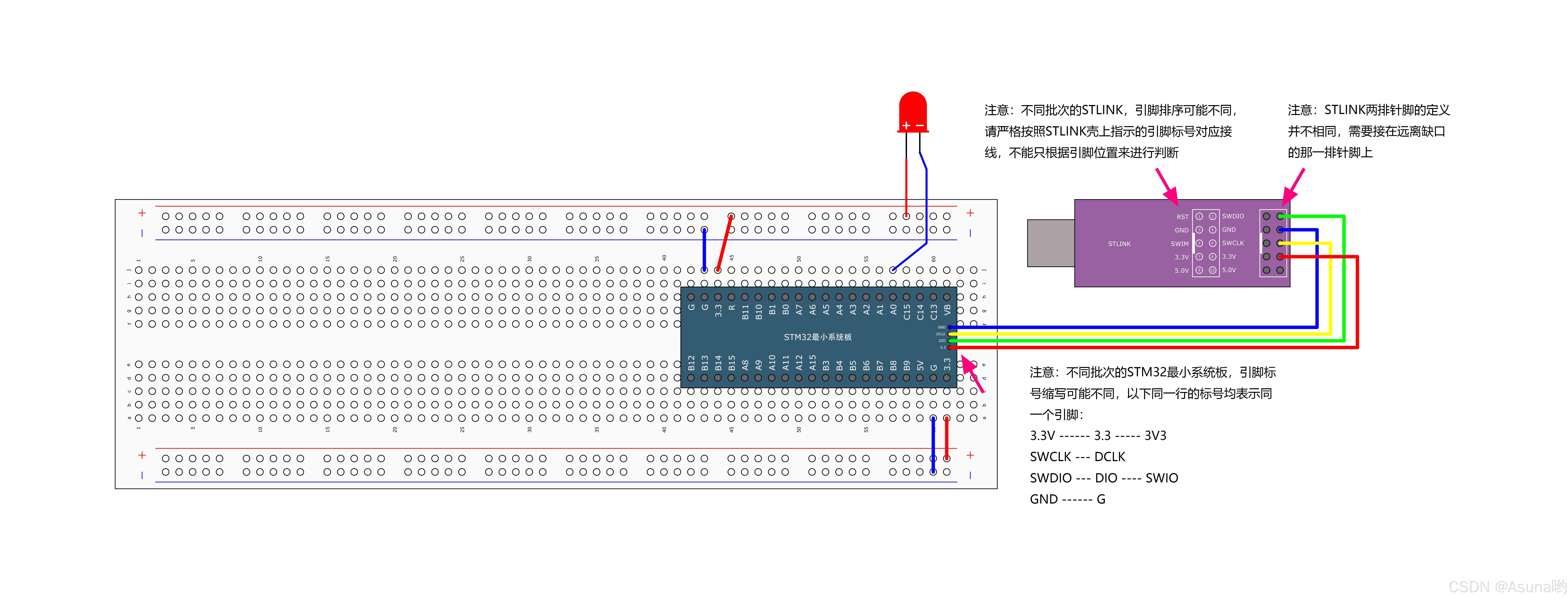
4.2小灯闪烁
接线图
main.c
#include "stm32f10x.h"                  // Device header
#include "Delay.h"

int main(void)
{
	/*开启时钟*/
	RCC_APB2PeriphClockCmd(RCC_APB2Periph_GPIOA, ENABLE);	//开启GPIOA的时钟
															//使用各个外设前必须开启时钟,否则对外设的操作无效

	/*GPIO初始化*/
	GPIO_InitTypeDef GPIO_InitStructure;					//定义结构体变量

	GPIO_InitStructure.GPIO_Mode = GPIO_Mode_Out_PP;		//GPIO模式,赋值为推挽输出模式
	GPIO_InitStructure.GPIO_Pin = GPIO_Pin_0;				//GPIO引脚,赋值为第0号引脚
	GPIO_InitStructure.GPIO_Speed = GPIO_Speed_50MHz;		//GPIO速度,赋值为50MHz

	GPIO_Init(GPIOA, &GPIO_InitStructure);					//将赋值后的构体变量传递给GPIO_Init函数
															//函数内部会自动根据结构体的参数配置相应寄存器
															//实现GPIOA的初始化

	/*主循环,循环体内的代码会一直循环执行*/
	while (1)
	{
		/*设置PA0引脚的高低电平,实现LED闪烁,下面展示3种方法*/

		/*方法1:GPIO_ResetBits设置低电平,GPIO_SetBits设置高电平*/
		GPIO_ResetBits(GPIOA, GPIO_Pin_0);					//将PA0引脚设置为低电平
		Delay_ms(500);										//延时500ms
		GPIO_SetBits(GPIOA, GPIO_Pin_0);					//将PA0引脚设置为高电平
		Delay_ms(500);										//延时500ms

		/*方法2:GPIO_WriteBit设置低/高电平,由Bit_RESET/Bit_SET指定*/
		GPIO_WriteBit(GPIOA, GPIO_Pin_0, Bit_RESET);		//将PA0引脚设置为低电平
		Delay_ms(500);										//延时500ms
		GPIO_WriteBit(GPIOA, GPIO_Pin_0, Bit_SET);			//将PA0引脚设置为高电平
		Delay_ms(500);										//延时500ms

		/*方法3:GPIO_WriteBit设置低/高电平,由数据0/1指定,数据需要强转为BitAction类型*/
		GPIO_WriteBit(GPIOA, GPIO_Pin_0, (BitAction)0);		//将PA0引脚设置为低电平
		Delay_ms(500);										//延时500ms
		GPIO_WriteBit(GPIOA, GPIO_Pin_0, (BitAction)1);		//将PA0引脚设置为高电平
		Delay_ms(500);										//延时500ms
	}
}
注意
GPIO_InitStructure.GPIO_Mode = GPIO_Mode_Out_PP;
//GPIO模式,赋值为推挽输出模式
//推挽输出高低电平均有驱动能力
GPIO_InitStructure.GPIO_Mode = GPIO_Mode_Out_OD;
//GPIO模式,赋值为开漏输出模式
//开漏输出仅能输出低电平(0)或 高电平相当于高阻态(Z),需要外部上拉电阻来实现高电平(1)。
一般输入输出用推挽模式就行,特殊的地方才会用到开漏模式。
在推挽模式下,GPIO 口不能直接并联。
4.3流水灯
接线图

未完待续
总结
作者:Asuna哟


