
 代码收藏家
代码收藏家 Java SE 13中的工具类详解
1.String
1.1 构建字符串
在Java中,String类的构建方式有很多种,这里介绍常见的四种
//构建字符串
    public static void main(String[] args) {
        //1.使用字符串常量进行赋值
        String string1 = "Hello World";
        System.out.println(string1);
        //2.new String
        String string2 = new String("Hello World");
        System.out.println(string2);
        //3.使用字符数组构造
        char[] chars = new char[]{'H','e','l','l','o',' ','W','o','r','l','d'};
        String string3 = new String(chars);
        System.out.println(string3);
        //4.使用字节数组构造
        byte[] bytes = new byte[]{72,101,108,108,111,32,87,111,114,108,100};
        String string4 = new String(bytes);
        System.out.println(string4);
    }
1.2 字符串存储原理
//字符串存储原理
    public static void main(String[] args) {
        String string1 = "Hello World";
        String string2 = "Hello World";
        String string3 = new String("Hello World");
        System.out.println(string1 == string2);//true
        System.out.println(string1 == string3);//false
    }

字符串常量池:是Java中用于优化字符串存储和性能的一种机制,旨在通过共享字符串字面量来节省内存并提高性能。实际是一个固定大小的HashTable(一种高效用来进行查找的数据结构)
字符串常量池的工作原理字面量创建:当你在代码中使用字符串字面量(例如 “Hello World”)时,Java会首先检查字符串常量池中是否已经存在相同的字符串。如果存在,则直接返回池中字符串的引用;如果不存在,则在池中创建一个新的字符串对象 使用new关键字创建字符串:当你使用 new 关键字创建字符串对象时,Java会创建一个新的字符串实例,即使字符串常量池中已经存在相同的字符串
1.3 字符串常用方法介绍
1.3.1 字符串的比较
==进行比较:对于基本类型,比较的是变量中的值;对于引用类型比较的是引用中的地址//使用==进行比较
public static void main(String[] args) {
int a = 1;
int b = 1;
int c = 2;
System.out.println(a == b);//true
System.out.println(a == c);//false
String string1 = new String("Hello World");
String string2 = new String("Hello World");
System.out.println(string1 == string2);//false
}
equals方法进行比较:Object中equals默认按照==比较;String重写equals方法后按照字典序比较,相同返回true,不同返回false//使用equals方法进行比较
public static void main(String[] args) {
String string1 = new String("Hello World");
String string2 = new String("Hello World");
String string3 = new String("hello world");
System.out.println(string1.equals(string2));//true
System.out.println(string1.equals(string3));//false
}
compareTo方法进行比较
从两个字符串的第一个字符开始,逐个字符进行比较。比较字符的Unicode值(即字符的整数值)。如果在某个位置上的字符不同,则返回两个字符的Unicode值之差
//使用compareTo方法进行比较
    public static void main(String[] args) {
        String string1 = new String("Hello World");
        String string2 = new String("Hello World");
        String string3 = new String("hello world");
        String string4 = new String("Hello");
        System.out.println(string1.compareTo(string2));//返回0
        System.out.println(string1.compareTo(string3));//返回-32,'H' - 'h'
        System.out.println(string1.compareTo(string4));//返回6,string1比string4长6个字符
    }
1.3.2 字符串的查找
char charAt(int index):返回index下标的字符,如果index为负数或者越界,抛出StringIndexOutOfBoundsException异常//charAt
public static void main(String[] args) {
String string = "0123456789";
System.out.println(string.charAt(0));//0
System.out.println(string.charAt(100));//StringIndexOutOfBoundsException
System.out.println(string.charAt(-1));//StringIndexOutOfBoundsException
}
int indexOf(int ch):返回指定字符在字符串中第一次出现的索引位置。如果字符未在字符串中找到,则返回-1。参数以Unicod代码点(int类型)形式传入//indexOf
public static void main(String[] args) {
String string = "HelloWorld";
//H的Unicode值:72
System.out.println(string.indexOf(72));//返回H的下标0
System.out.println(string.indexOf(1));//返回-1
}
int indexOf(int ch, int fromIndex):从fromIndex下标开始,返回指定字符在字符串中第一次出现的索引位置。如果字符未在字符串中找到,则返回-1。参数以Unicod代码点(int类型)形式传入//indexOf
public static void main(String[] args) {
String string = "HelloHello";
//H的Unicode值:72
System.out.println(string.indexOf(72, 3));//返回第二个H的下标5
}
int indexOf(String str):返回指定字符在字符串中第一次出现的索引位置。如果字符未在字符串中找到,则返回-1//indexOf
public static void main(String[] args) {
String string = "HelloWorld";
//H的Unicode值:72
System.out.println(string.indexOf("H"));//返回H的下标0
System.out.println(string.indexOf('H'));//返回H的下标0
System.out.println(string.indexOf("Z"));//返回-1
System.out.println(string.indexOf('Z'));//返回-1
}
int indexOf(String str, int fromIndex):从fromIndex下标开始,返回指定字符在字符串中第一次出现的索引位置。如果字符未在字符串中找到,则返回-1//indexOf
public static void main(String[] args) {
String string = "HelloHello";
System.out.println(string.indexOf("H", 3));//返回第二个H的下标5
}
1.3.3 字符串转换
valueOf:将不同的数据类型转换为字符串//valueOf
public static void main(String[] args) {
String string1 = String.valueOf(10);
System.out.println(string1);//10
String string2 = String.valueOf(10.0);
System.out.println(string2);//10.0
String string3 = String.valueOf(true);
System.out.println(string3);//true
}
public static void main(String[] args) {
        int data1 = Integer.parseInt("12345");
        System.out.println(data1);//12345
        double data2 = Double.parseDouble("12345.0");
        System.out.println(data2);//12345.0
        boolean data3 = Boolean.parseBoolean("true");
        System.out.println(data3);//true
    }
String toUpperCase():将字符串中的所有字符转换为大写形式String toLowerCase():将字符串中的所有字符转换为小写形式//String toUpperCase()
//String toLowerCase()
public static void main(String[] args) {
String string1 = "Hello World";
System.out.println(string1.toLowerCase());//hello world
String string2 = "Hello World";
System.out.println(string2.toUpperCase());//HELLO WORLD
}
char[] toCharArray():将字符串转换为字符数组//toCharArray
public static void main(String[] args) {
String string = "Hello World";
char[] array = string.toCharArray();
for (char c : array) {
System.out.print(c + " ");
}
//输出结果:H e l l o W o r l d
System.out.println();
}
static String format(String format, Object... args):通过格式化字符串和可变参数生成格式化后的字符串输出//format
public static void main(String[] args) {
String name = "Alice";
int age = 30;
String result1 = String.format("Name: %s, Age: %d", name, age);
System.out.println(result1);//Name: Alice, Age: 30
String result2 = String.format("%d-%d-%d", 2025, 6,12);
System.out.println(result2);//2025-6-12
}
1.3.4 字符串替换
| 方法 | 功能 |
|---|---|
String replaceAll(String regex, String replacement) |
将所有的regex替换为replacement |
String replaceFirst(String regex, String replacement) |
将首个regex替换为replacement |
//replaceAll
//replaceFirst
    public static void main(String[] args) {
        String string = "Hello World";
        String string1 = string.replaceAll("l", "_");
        System.out.println(string1);//He__o Wor_d
        String string2 = string.replaceFirst("l", "_");
        System.out.println(string2);//He_lo World
    }
1.3.5 字符串拆分
| 方法 | 功能 |
|---|---|
String[] split(String regex) |
根据正则表达式regex将字符串分割成数组 |
String[] split(String regex, int limit) |
根据正则表达式regex将字符串分割成数组,并通过limit 参数控制分割后的数组数量 |
正则表达式(Regular Expression,简称 regex 或 regexp):是一种用于匹配字符串中字符模式的强大工具。它广泛应用于文本搜索、替换、验证和数据提取等场景。正则表达式由一系列字符和特殊符号组成,这些符号定义了搜索模式
1.基本语法普通字符:匹配自身。例如, a匹配字符 “a”元字符:具有特殊含义的字符,如 .、*、+、?、^、$、[]、()、{}、|等
2.常用元字符.(点):匹配除换行符之外的任何单个字符示例: a.b匹配 “aab”、“acb”、“a3b” 等^(脱字符):匹配字符串的开始示例: ^Hello匹配以 “Hello” 开头的字符串$(美元符):匹配字符串的结束示例: world$匹配以 “world” 结尾的字符串[](方括号):定义一个字符集,匹配其中任意一个字符示例: [abc]匹配 “a”、“b” 或 “c”范围表示法: [a-z]匹配任意小写字母,[0-9]匹配任意数字否定: [^abc]匹配除 “a”、“b”、“c” 之外的任意字符|(竖线):表示“或”关系示例: cat|dog匹配 “cat” 或 “dog”()(圆括号):用于分组,可以提取子匹配或应用量词示例: (ab)+匹配一个或多个连续的 “ab”量词: *:匹配前面的表达式零次或多次示例: ab*c匹配 “ac”、“abc”、“abbbc” 等+:匹配前面的表达式一次或多次示例: ab+c匹配 “abc”、“abbbc” 等,但不匹配 “ac”?:匹配前面的表达式零次或一次示例: ab?c匹配 “ac” 或 “abc”{n}:匹配前面的表达式恰好 n 次示例: a{3}匹配 “aaa”{n,}:匹配前面的表达式至少 n 次示例: a{2,}匹配 “aa”、“aaa”、“aaaa” 等{n,m}:匹配前面的表达式至少 n 次,但不超过 m 次示例: a{2,3}匹配 “aa”、“aaa”
//split
    public static void main(String[] args) {
        String string1 = "Hello World";
        String[] array1 = string1.split(" ");
        for (String s : array1) {
            System.out.println(s);
        }
        //Hello
        //World
        String string2 = "Hello World Hello World";
        String[] array2 = string2.split(" ", 2);
        for (String s : array2) {
            System.out.println(s);
        }
        //Hello
        //World Hello World
    }
1.3.5 字符串截取
| 方法 | 功能 |
|---|---|
String substring(int beginIndex) |
用于从字符串中截取子字符串,从指定的beginIndex下标开始,直至字符串末尾。返回的新字符串包含原字符串从beginIndex下标开始的剩余部分 |
String substring(int beginIndex, int endIndex) |
返回从beginIndex到endIndex-1的子字符串。若参数不合法(如负值或beginIndex > endIndex),抛出IndexOutOfBoundsException |
//substring
    public static void main(String[] args) {
        String string = "Hello World";
        String substring1 = string.substring(1);//[1,end)
        System.out.println(substring1);//ello World
        String substring2 = string.substring(1, 2);//[1,2)
        System.out.println(substring2);//e
    }
1.3.6 去除空格
String trim():用于去除字符串两端的空白字符//trim()
public static void main(String[] args) {
String string = " Hello World ";
String trim = string.trim();
System.out.println("[" + trim + "]");//[Hello World]
}
1.3.7 intern方法
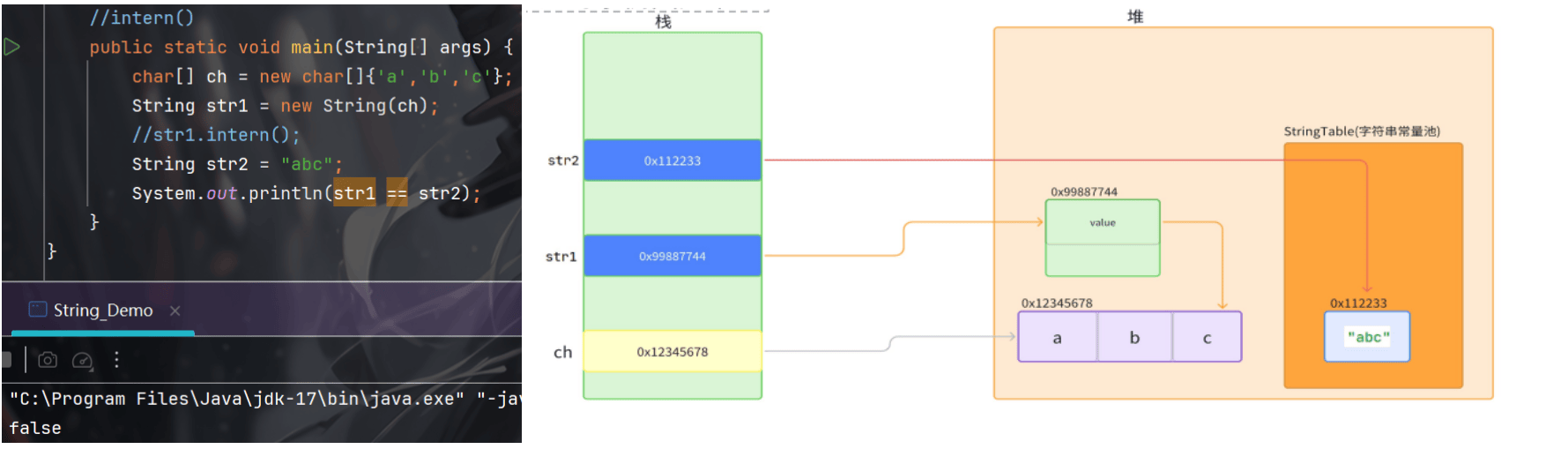
native String intern():用于将字符串对象动态添加到字符串常量池中,并返回池中的唯一引用。调用 intern() 时,JVM 会检查常量池中是否存在内容相同的字符串:

1.4 字符串的不可变性
字符串的不可变性:指String对象一旦创建,其内容就无法更改。任何看似修改字符串的操作(如拼接、替换)实际上都会创建新的String对象
不可变性的实现原理:String类内部使用private final修饰的byte数组存储数据,且不提供修改该数组的方法

1.5 StringBuilder&StringBuffer
    public static void main(String[] args) {
        String string = "Hello";
        string = string + "World";
        System.out.println(string);//输出Hello World
    }
在上述代码中,
s + " world"创建了一个新的String对象,而原的"Hello"对象保持不变。对于String的拼接来说,如果是在循环当中会产生很多的临时对象。此时Java提供了StringBuilder和StringBuffer
    public static void main(String[] args) {
        //String
        long start = System.currentTimeMillis();
        String string = "";
        for (int i = 0; i < 10000; i++) {
            string = string + i;
        }
        long end = System.currentTimeMillis();
        System.out.println(end - start);//输出结果在60左右
        //StringBuilder
        start = System.currentTimeMillis();
        StringBuilder stringBuilder = new StringBuilder("");
        for (int i = 0; i < 10000; i++) {
            stringBuilder.append(i);
        }
        end = System.currentTimeMillis();
        System.out.println(end - start);//输出结果不超过2
    }
可以看到在对String类进行拼接时,效率是非常慢。因此:如果要修改建议尽量使用StringBuilder或者StringBuffer
String:String对象是不可变的,任何修改操作(如拼接、替换)都会生成新的String对象,原对象不变 适用于字符串内容不频繁变化的场景,因不可变性带来线程安全性 频繁修改String会导致大量临时对象,影响性能
StringBuilder:StringBuilder同样是可变的字符序列,修改操作直接在原对象上进行 非线程安全,无同步开销,单线程环境下性能最优
StringBuffer:StringBuffer是可变的字符序列,修改操作直接在原对象上进行 线程安全,所有方法使用synchronized关键字修饰,适合多线程环境 性能略低于StringBuilder,因同步开销


2.日期类
2.1 Date类
Java中的Date类位于java.util包中,用于表示特定的时间点,精确到毫秒。它是Java早期版本中处理日期和时间的主要类,但在Java 8之后,推荐使用java.time包中的新日期时间API(LocalDateTime类),因为Date类存在设计缺陷和线程安全问题

public class Date_Demo {
    public static void main(String[] args) {
        Date date1 = new Date();
        //不带参数的构造方法表示获取当前时间
        System.out.println(date1);//Fri Jun 13 20:09:22 CST 2025
        Date date2 = new Date(125,5,13);
        //参数⼀:Date默认的时间是从1900年开始计算的,这⾥的125会和1900加得到2025,⽤来确定年份
        //参数⼆:2代表3⽉,也就是说0代表1月,1代表2月,以此类推
        //参数三:代表实际的日期
        System.out.println(date2);//Fri Jun 13 00:00:00 CST 2025
    }
}
Date类已经过时了,下面重点介绍LocalDateTime类
2.2 LocalDateTime类
2.2.1 概述
LocalDateTime是Java8引入的日期时间 API(java.time 包)中的一个类,用于表示不带时区的日期和时间(即本地日期时间)。它结合了 LocalDate 和 LocalTime 的功能,适用于不需要时区信息的场景
2.2.2 创建LocalDateTime对象
LocalDateTime类的构造方法使用
private修饰,无法通过new关键字来实例化对象

now()方法:获取当前的日期和时间of()方法:指定年、月、日、时、分等参数创建对象 public static void main(String[] args) {
LocalDateTime time1 = LocalDateTime.now();
System.out.println(time1);//2025-06-13T22:58:00.587917400
LocalDateTime time2 = LocalDateTime.of(2025, 6, 13, 22, 57);
System.out.println(time2);//2025-06-13T22:57
}
LocalDate和LocalTime组合:将LocalDate和LocalTime 对象组合成 LocalDateTime public static void main(String[] args) {
LocalDate date = LocalDate.now();
LocalTime time = LocalTime.now();
LocalDateTime dateTime = LocalDateTime.of(date, time);
System.out.println(dateTime);//2025-06-13T23:01:00.030160400
}
parse()方法:解析符合ISO-8601格式的字符串解析 public static void main(String[] args) {
LocalDateTime parsedDateTime = LocalDateTime.parse("2026-06-13T23:03:00");
System.out.println(parsedDateTime);//2026-06-13T23:03
}
ofPattern()方法:由DateTimeFormatter类提供,用于创建一个自定义的日期时间格式。可以将LocalDateTime对象格式化为字符串,或者将字符串解析为LocalDateTime对象 public static void main(String[] args) {
String stringDate = "2026-06-13 23:03:10";
//创建⼀个自定义的日期时间格式化器
DateTimeFormatter formatter = DateTimeFormatter.ofPattern("yyyy-MM-dd HH:mm:ss");
//1.解析字符串为LocalDateTime
LocalDateTime dateTime = LocalDateTime.parse(stringDate, formatter);
System.out.println(dateTime);//2026-06-13T23:03:10
//2.格式化LocalDateTime为字符串
String stringTime = dateTime.format(formatter);
System.out.println(stringTime);//2026-06-13 23:03:10
}
2.2.3 获取年月日时分秒
    public static void main(String[] args) {
        LocalDateTime time = LocalDateTime.now();
        //获取年
        int year = time.getYear();
        //获取月
        int month1 = time.getMonthValue();
        Month month2 = time.getMonth();
        //获取日
        int day = time.getDayOfMonth();
        //获取时
        int hour = time.getHour();
        //获取分
        int minute = time.getMinute();
        //获取秒
        int second = time.getSecond();
        System.out.println(year);//2025
        System.out.println(month1);//6
        System.out.println(month2);//JUNE
        System.out.println(day);//13
        System.out.println(hour);//23
        System.out.println(minute);//7
        System.out.println(second);//10
    }
2.2.4 获取具体详细信息
    public static void main(String[] args) {
        LocalDate date = LocalDate.now();
        System.out.println(date);//2025-06-13
        //本周第几天
        int dayOfWeek = date.getDayOfWeek().getValue();
        System.out.println(dayOfWeek);//5,表示星期五
        //本月第几天
        int dayOfMonth = date.getDayOfMonth();
        System.out.println(dayOfMonth);//13
        //今年第几天
        int dayOfYear = date.getDayOfYear();
        System.out.println(dayOfYear);//164
    }
2.2.5 日期运算
1.加/减天数 public static void main(String[] args) {
LocalDateTime date = LocalDateTime.now();
System.out.println("当前日期:" + date);
LocalDateTime date1 = date.plusDays(1);
System.out.println("增加一天后的日期:" + date1);
LocalDateTime date2 = date.minusDays(1);
System.out.println("减少一天后的日期:" + date2);
}
2.加/减周数 public static void main(String[] args) {
LocalDateTime date = LocalDateTime.now();
System.out.println("当前日期:" + date);
LocalDateTime date1 = date.plusWeeks(1);
System.out.println("增加一周后的日期:" + date1);
LocalDateTime date2 = date.minusWeeks(1);
System.out.println("减少一周后的日期:" + date2);
}
3.加/减月数 public static void main(String[] args) {
LocalDateTime date = LocalDateTime.now();
System.out.println("当前日期:" + date);
LocalDateTime date1 = date.plusMonths(1);
System.out.println("增加一月后的日期:" + date1);
LocalDateTime date2 = date.minusMonths(1);
System.out.println("减少一月后的日期:" + date2);
}
4.加/减年数 public static void main(String[] args) {
LocalDateTime date = LocalDateTime.now();
System.out.println("当前日期:" + date);
LocalDateTime date1 = date.plusYears(1);
System.out.println("增加一年后的日期:" + date1);
LocalDateTime date2 = date.minusYears(1);
System.out.println("减少一年后的日期:" + date2);
}
2.2.6 根据当前时间获取指定时间
获取当前日期所在周的周日和周一 public static void main(String[] args) {
LocalDateTime curDate = LocalDateTime.now();
System.out.println("当前日期:" + curDate);
LocalDateTime firstDayOfWeek = curDate.with(TemporalAdjusters.previousOrSame(DayOfWeek.MONDAY));
System.out.println("这周的周一:" + firstDayOfWeek);
LocalDateTime lastDayOfWeek = curDate.with(TemporalAdjusters.nextOrSame(DayOfWeek.SUNDAY));
System.out.println("这周的周天:" + lastDayOfWeek);
}
previousOrSame:寻找当前日期或之前最近的指定星期几
nextOrSame:寻找当前日期或之后最近的指定星期几
获取当前日期所在月的第一天和最后一天的日期 public static void main(String[] args) {
LocalDateTime curDate = LocalDateTime.now();
System.out.println("当前日期:" + curDate);
LocalDateTime firstDayOfMonth = curDate.with(TemporalAdjusters.firstDayOfMonth());
System.out.println("本月的第一天:" + firstDayOfMonth);
LocalDateTime lastDayOfMonth = curDate.with(TemporalAdjusters.lastDayOfMonth());
System.out.println("本月的最后一天:" + lastDayOfMonth);
}
作者:九转苍翎


