
 代码收藏家
代码收藏家 Python异步爬虫实战案例:某车之家数据抓取与aiomysql的应用实践
使用的技术知识点
1. 异步编程
2. 网络请求与数据处理
3. 数据存储与去重
4. 反爬策略处理
5. 代码结构与设计模式
目标网址:https://www.che168.com/china/a0_0msdgscncgpi1ltocsp1exf4x0/?pvareaid=102179#currengpostion

爬取的内容是每个车辆的详细参数
随便进入一个汽车信息,点击(全部参数配置)

这就是目标信息

第一步 分析网页
1.随便定位一个信息,然后复制在网络里面搜索
2.左边有一个接口,点进去就是目标信息

在网络请求头里面可以看到specid是每个汽车对应的编号
那就接下来寻找每个汽车的id

在首页可以分析到这个li标签很不寻常,因为他很长,啊哈哈哈
里面有对应汽车的specid,那么就可以拿出每个汽车的specid了

第二步 敲代码
1.导入所需的模块
# 导入所需模块  安装:pip install XXX
import redis  # Redis数据库操作
import chardet  # 字符编码检测
import hashlib  # 哈希加密
import asyncio  # Python异步IO框架
import aiohttp  # 异步HTTP客户端
import aiomysql  # 异步MySQL客户端
from lxml import etree  # XML/HTML解析库
2.创建一个类,进行初始化
注意:第一个url是首页的网址这里使用动态方法进行换页处理

同样第二个api_url是详细数据的网址

这里发现直接访问接口地址,返回的并不是一个json
网址后面有一个callback=configTitle,众所周知callback是回调函数,删掉即可,或者用正则表达式,我觉得直接删除回调是最简单的。

class CarSpider:
    # 类变量,Redis客户端连接
    redis_client = redis.Redis()

    def __init__(self):
        # 初始化方法,设置URL和请求头
        self.url = 'https://www.che168.com/china/a0_0msdgscncgpi1ltocsp{}exf4x0/?pvareaid=102179#currengpostion'  # 汽车列表页URL模板
        self.api_url = 'https://cacheapigo.che168.com/CarProduct/GetParam.ashx?specid={}'  # 汽车详情API URL模板
        self.headers = {
            'User-Agent': 'Mozilla/5.0 (Windows NT 10.0; Win64; x64) AppleWebKit/537.36 (KHTML, like Gecko) Chrome/135.0.0.0 Safari/537.36 Edg/135.0.0.0'
        }  # 请求头,模拟浏览器访问
3.网站请求
使用协程,上下文管理器,字节判断,xpath分析
为什么要判断是不是GB2312或者ISO-8859-1?
因为协程很快,出发网页的反爬机制,正确数据是GB2312,错误数据就是UTF-8
大致逻辑: 协程请求首页网址,判断是否触发反爬,使用xpath获取每个汽车的ID,然后把获取的ID遍历给api_url。
    async def get_car_id(self, page_num, session, pool):
        """
        获取汽车ID列表
        :param page_num: 页码
        :param session: aiohttp会话对象
        :param pool: MySQL连接池
        """
        async with session.get(url=self.url.format(page_num), headers=self.headers) as response:
            # 获取页面的字节数据
            html_bytes = await response.read()  # 读取响应内容(bytes类型)
            html_str = chardet.detect(html_bytes)['encoding']  # 检测页面编码

            # 根据编码类型解码
            if html_str == 'GB2312' or html_str == 'ISO-8859-1':
                result = html_bytes.decode('gbk')
            else:
                print(f'第 {page_num} 页面: 反扒机制拦截')  # 反爬提示
                result = html_bytes.decode(html_str)

            # 使用xpath解析页面,获取汽车specid列表
            tree = etree.HTML(result)
            car_id_list = tree.xpath('//ul[@class="viewlist_ul"]/li/@specid')

            if car_id_list:
                print(f'第 {page_num} 页面: 获取到 {len(car_id_list)} 条数据')
                # 为每个汽车ID创建获取详情的任务
                task = [asyncio.create_task(self.get_car_info(car_id, session, pool)) for car_id in car_id_list]
                await asyncio.wait(task)  # 等待所有任务完成
4.获取汽车详细信息
上面把网址传给了这个函数,然后解析数据,很简单,再把数据传给 save_car_info 函数
    async def get_car_info(self, car_id, session, pool):
        """
        获取汽车详细信息
        :param car_id: 汽车ID
        :param session: aiohttp会话对象
        :param pool: MySQL连接池
        """
        async with session.get(url=self.api_url.format(car_id), headers=self.headers) as response:
            result = await response.json()  # 解析JSON响应

            # 检查是否有有效数据
            if result['result'].get('paramtypeitems'):
                item = dict()  # 创建字典存储汽车信息
                # 从JSON中提取所需字段
                item['name'] = result['result']['paramtypeitems'][0]['paramitems'][0]['value']
                item['price'] = result['result']['paramtypeitems'][0]['paramitems'][1]['value']
                item['brand'] = result['result']['paramtypeitems'][0]['paramitems'][2]['value']
                item['altitude'] = result['result']['paramtypeitems'][1]['paramitems'][2]['value']
                item['breadth'] = result['result']['paramtypeitems'][1]['paramitems'][1]['value']
                item['length'] = result['result']['paramtypeitems'][1]['paramitems'][0]['value']

                # 保存汽车信息
                await self.save_car_info(item, pool)
            else:
                print('无数据')  # 无数据提示
5.生成字典的MD5哈希值,用于去重
md5加密数据,用于后面去重。
    @staticmethod
    def get_md5(dict_item):
        """
        生成字典的MD5哈希值,用于去重
        :param dict_item: 字典数据
        :return: MD5哈希值
        """
        md5 = hashlib.md5()
        md5.update(str(dict_item).encode('utf-8'))  # 将字典转为字符串并编码
        return md5.hexdigest()  # 返回16进制哈希值
6.保存汽车信息到MySQL数据库
这里就一些python操作mysq与redis,不必多说
    async def save_car_info(self, item, pool):
        """
        保存汽车信息到MySQL数据库
        :param item: 汽车信息字典
        :param pool: MySQL连接池
        """
        async with pool.acquire() as conn:  # 从连接池获取连接
            async with conn.cursor() as cursor:  # 获取游标
                val_md5 = self.get_md5(item)  # 生成数据MD5

                # 使用Redis集合进行去重
                redis_result = self.redis_client.sadd('car:list', val_md5)

                if redis_result:  # 如果数据不存在
                    # SQL插入语句
                    sql = 'insert into car_info(id, name, price, brand, altitude, breadth, length) values(%s, %s, %s, %s, %s, %s, %s);'
                    try:
                        # 执行SQL插入
                        await cursor.execute(sql, (
                            0, item['name'], item['price'], item['brand'], item['altitude'], item['breadth'],
                            item['length']))
                        await conn.commit()  # 提交事务
                        print(f'保存数据成功: {item}')
                    except Exception as e:
                        print(f'保存数据失败: {e}')
                        await conn.rollback()  # 回滚事务
                else:
                    print(f'数据已存在: {item}')  # 数据已存在提示
7.主函数,协调整个爬虫流程
创建异步mysql连接,这里使用了 show tables like 'car_info' 判断表是否存在,
注意在异步中是不能使用 create table if not exists
    async def main(self):
        """
        主函数,协调整个爬虫流程
        """
        # 创建MySQL连接池
        async with aiomysql.create_pool(host='127.0.0.1', port=3306, user='root', password='abc123',
                                        db='db_spider') as pool:
            # 检查并创建表
            async with pool.acquire() as conn:
                async with conn.cursor() as cursor:
                    # 建表SQL
                    sql = 'create table car_info(id int primary key auto_increment, name varchar(255), price varchar(255), brand varchar(255), altitude varchar(255), breadth varchar(255), length varchar(255));'
                    check_table_query = "show tables like 'car_info'"
                    result = await cursor.execute(check_table_query)
                    if result == 0:  # 表不存在
                        await cursor.execute(sql)
                        print('创建表成功')
                    else:
                        print('表已存在')

            # 创建aiohttp会话
            async with aiohttp.ClientSession() as session:
                # 创建15个页面爬取任务(1-15页)
                task = [asyncio.create_task(self.get_car_id(page_num, session, pool)) for page_num in range(1, 16)]
                await asyncio.wait(task)  # 等待所有任务完成
8. 启动函数
这个调用方法在协程中,对比 asyncio.run(main())方法,会减少一半的出错概率,不兼容
if __name__ == '__main__':
    car_spider = CarSpider()  # 创建爬虫实例
    loop = asyncio.get_event_loop()  # 获取事件循环
    loop.run_until_complete(car_spider.main())  # 运行主函数
最后:确定自己的Redis与MySQL是否安装,启动,账号密码,数据库是否存在
这里看运行结果,被拦截的挺多,使用cookie或者代理池但是都收费
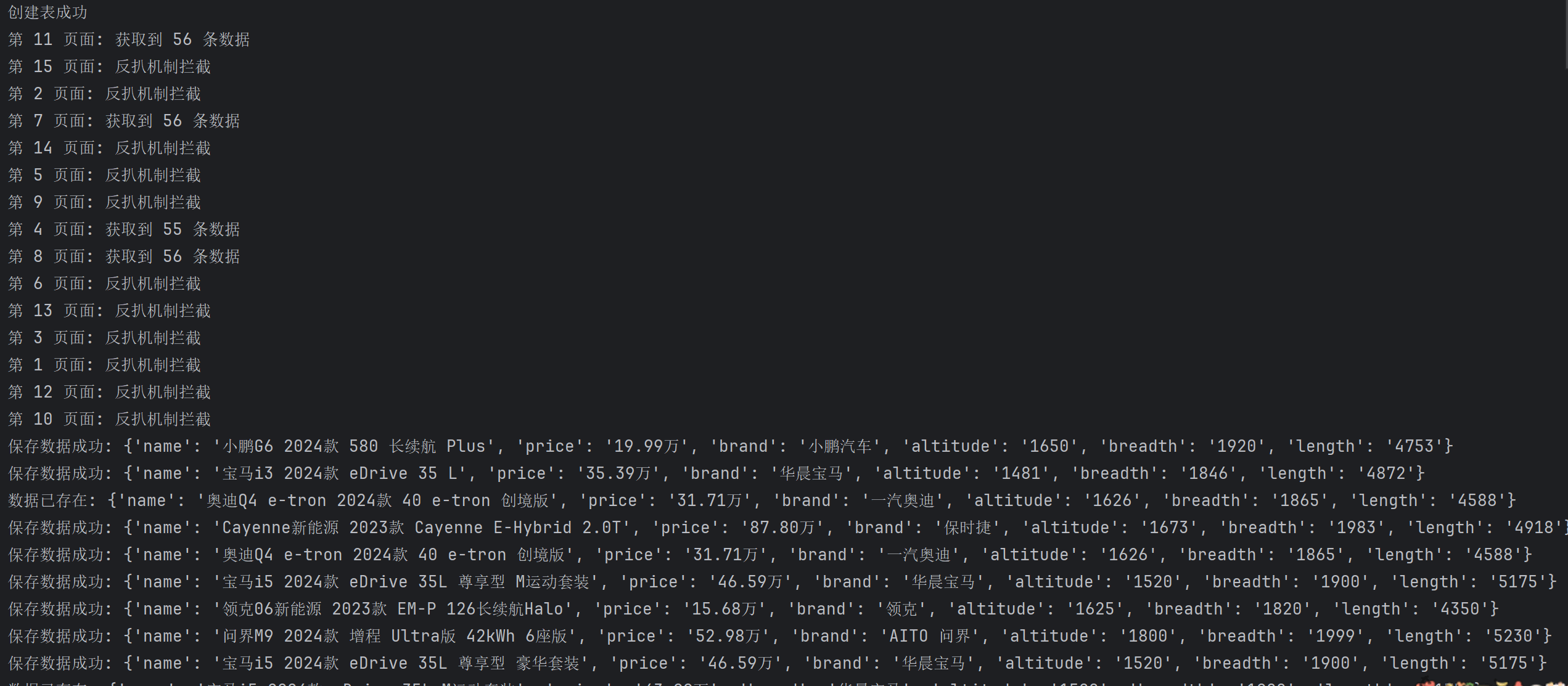
有重复数据就是,二手车嘛,好几家同时卖一辆车。

Redis展示

MySQL展示

完整代码
"""
@File    :6. 汽车之家-MSQL.py
@IDE     :PyCharm
@Author  :易辰的烂笔头
@Date    :2025/5/11 18:32
"""
# 导入所需模块
import redis  # Redis数据库操作
import chardet  # 字符编码检测
import hashlib  # 哈希加密
import asyncio  # Python异步IO框架
import aiohttp  # 异步HTTP客户端
import aiomysql  # 异步MySQL客户端
from lxml import etree  # XML/HTML解析库


class CarSpider:
    # 类变量,Redis客户端连接
    redis_client = redis.Redis()

    def __init__(self):
        # 初始化方法,设置URL和请求头
        self.url = 'https://www.che168.com/china/a0_0msdgscncgpi1ltocsp{}exf4x0/?pvareaid=102179#currengpostion'  # 汽车列表页URL模板
        self.api_url = 'https://cacheapigo.che168.com/CarProduct/GetParam.ashx?specid={}'  # 汽车详情API URL模板
        self.headers = {
            'User-Agent': 'Mozilla/5.0 (Windows NT 10.0; Win64; x64) AppleWebKit/537.36 (KHTML, like Gecko) Chrome/135.0.0.0 Safari/537.36 Edg/135.0.0.0'
        }  # 请求头,模拟浏览器访问

    async def get_car_id(self, page_num, session, pool):
        """
        获取汽车ID列表
        :param page_num: 页码
        :param session: aiohttp会话对象
        :param pool: MySQL连接池
        """
        async with session.get(url=self.url.format(page_num), headers=self.headers) as response:
            # 获取页面的字节数据
            html_bytes = await response.read()  # 读取响应内容(bytes类型)
            html_str = chardet.detect(html_bytes)['encoding']  # 检测页面编码

            # 根据编码类型解码
            if html_str == 'GB2312' or html_str == 'ISO-8859-1':
                result = html_bytes.decode('gbk')
            else:
                print(f'第 {page_num} 页面: 反扒机制拦截')  # 反爬提示
                result = html_bytes.decode(html_str)

            # 使用xpath解析页面,获取汽车specid列表
            tree = etree.HTML(result)
            car_id_list = tree.xpath('//ul[@class="viewlist_ul"]/li/@specid')

            if car_id_list:
                print(f'第 {page_num} 页面: 获取到 {len(car_id_list)} 条数据')
                # 为每个汽车ID创建获取详情的任务
                task = [asyncio.create_task(self.get_car_info(car_id, session, pool)) for car_id in car_id_list]
                await asyncio.wait(task)  # 等待所有任务完成

    async def get_car_info(self, car_id, session, pool):
        """
        获取汽车详细信息
        :param car_id: 汽车ID
        :param session: aiohttp会话对象
        :param pool: MySQL连接池
        """
        async with session.get(url=self.api_url.format(car_id), headers=self.headers) as response:
            result = await response.json()  # 解析JSON响应

            # 检查是否有有效数据
            if result['result'].get('paramtypeitems'):
                item = dict()  # 创建字典存储汽车信息
                # 从JSON中提取所需字段
                item['name'] = result['result']['paramtypeitems'][0]['paramitems'][0]['value']
                item['price'] = result['result']['paramtypeitems'][0]['paramitems'][1]['value']
                item['brand'] = result['result']['paramtypeitems'][0]['paramitems'][2]['value']
                item['altitude'] = result['result']['paramtypeitems'][1]['paramitems'][2]['value']
                item['breadth'] = result['result']['paramtypeitems'][1]['paramitems'][1]['value']
                item['length'] = result['result']['paramtypeitems'][1]['paramitems'][0]['value']

                # 保存汽车信息
                await self.save_car_info(item, pool)
            else:
                print('无数据')  # 无数据提示

    @staticmethod
    def get_md5(dict_item):
        """
        生成字典的MD5哈希值,用于去重
        :param dict_item: 字典数据
        :return: MD5哈希值
        """
        md5 = hashlib.md5()
        md5.update(str(dict_item).encode('utf-8'))  # 将字典转为字符串并编码
        return md5.hexdigest()  # 返回16进制哈希值

    async def save_car_info(self, item, pool):
        """
        保存汽车信息到MySQL数据库
        :param item: 汽车信息字典
        :param pool: MySQL连接池
        """
        async with pool.acquire() as conn:  # 从连接池获取连接
            async with conn.cursor() as cursor:  # 获取游标
                val_md5 = self.get_md5(item)  # 生成数据MD5

                # 使用Redis集合进行去重
                redis_result = self.redis_client.sadd('car:list', val_md5)

                if redis_result:  # 如果数据不存在
                    # SQL插入语句
                    sql = 'insert into car_info(id, name, price, brand, altitude, breadth, length) values(%s, %s, %s, %s, %s, %s, %s);'
                    try:
                        # 执行SQL插入
                        await cursor.execute(sql, (
                            0, item['name'], item['price'], item['brand'], item['altitude'], item['breadth'],
                            item['length']))
                        await conn.commit()  # 提交事务
                        print(f'保存数据成功: {item}')
                    except Exception as e:
                        print(f'保存数据失败: {e}')
                        await conn.rollback()  # 回滚事务
                else:
                    print(f'数据已存在: {item}')  # 数据已存在提示

    async def main(self):
        """
        主函数,协调整个爬虫流程
        """
        # 创建MySQL连接池
        async with aiomysql.create_pool(host='127.0.0.1', port=3306, user='root', password='abc123',
                                        db='db_spider') as pool:
            # 检查并创建表
            async with pool.acquire() as conn:
                async with conn.cursor() as cursor:
                    # 建表SQL
                    sql = 'create table car_info(id int primary key auto_increment, name varchar(255), price varchar(255), brand varchar(255), altitude varchar(255), breadth varchar(255), length varchar(255));'
                    check_table_query = "show tables like 'car_info'"
                    result = await cursor.execute(check_table_query)
                    if result == 0:  # 表不存在
                        await cursor.execute(sql)
                        print('创建表成功')
                    else:
                        print('表已存在')

            # 创建aiohttp会话
            async with aiohttp.ClientSession() as session:
                # 创建15个页面爬取任务(1-15页)
                task = [asyncio.create_task(self.get_car_id(page_num, session, pool)) for page_num in range(1, 16)]
                await asyncio.wait(task)  # 等待所有任务完成


if __name__ == '__main__':
    car_spider = CarSpider()  # 创建爬虫实例
    loop = asyncio.get_event_loop()  # 获取事件循环
    loop.run_until_complete(car_spider.main())  # 运行主函数
作者:Gɪᴠᴇ ᴜᴘ.797


